

If you own an older iPad – or are considering buying a refurbished iPad – you may be wondering how long Apple will continue to support it and whether you should update to a newer model.
Apple has one of the best software support records in the industry. Many iPads receive major iPadOS updates for six to eight years, and some continue to receive security updates even after they stop getting new features.
As of September 2026, iPads that can run iPadOS 27 receive Apple’s current operating system and are fully supported. Some older models that cannot upgrade to iPadOS 27 are still receiving security updates through older versions of iPadOS. Eventually every device reaches a point where Apple stops providing software updates and hardware repairs though.
Here’s what you need to know about how long iPads remain supported, when it’s time to upgrade, and which older models are still worth buying.
Fully supported iPads can run the latest version of iPadOS, currently iPadOS 27.
Apple’s iPadOS 27 compatibility list includes the 4th-generation 12.9-inch Pro, 2nd-generation 11-inch Pro, 4th-generation Air, 9th-generation iPad and 6th-generation mini.
Unfortunately, iPadOS 27 dropped support for:
Those models have not been abandoned, however. Apple released iPadOS 26.7 on September 14 and iPadOS 26.7.1 on September 28 for the iPads that cannot move to iPadOS 27.
Older models that cannot run the latest release may continue to receive security updates for several years. However, once Apple stops providing security patches, users may encounter increasing security risks and app compatibility problems.
Apple may continue providing security updates for devices that can no longer run the latest iPadOS for several years. For example, the 7th-generation iPad still receives iPadOS 18 security updates, with iPadOS 18.7.10 released on August 17, 2026. The 2nd-generation iPad Pro and 6th-generation iPad run iPadOS 17, which was updated to version 17.7.11 in May 2026. Apple also issued security updates for iPadOS 16 and iPadOS 15 at the same time.
Apple does not promise how long it will maintain each older version of iPadOS. The arrival of iPadOS 27 has already shifted the support picture: iPadOS 26 remains supported for devices that cannot upgrade to iPadOS 27, while the 7th-generation iPad remains on the iPadOS 18 security branch. If your iPad can no longer run the latest version of iPadOS and is no longer receiving security updates, it is nearing the end of its practical lifespan.
Check the chart below to see whether your iPad can run iPadOS 27 or is still receiving security updates.
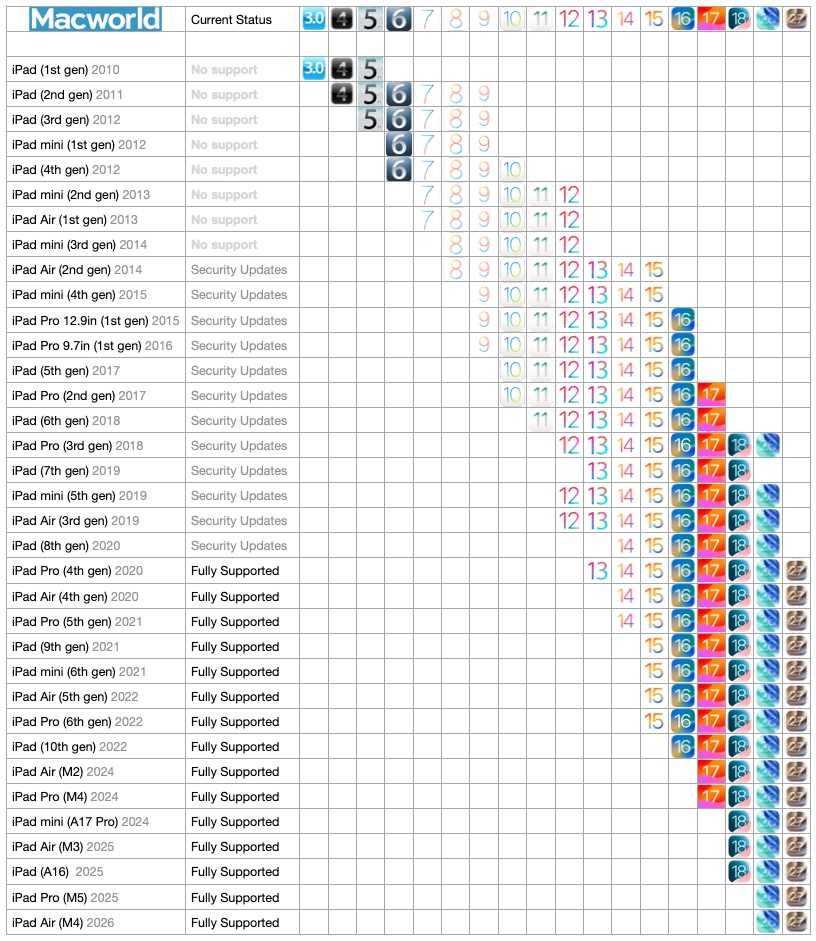
The iPads supported by iPadOS
..
Foundry
Foundry
Apple doesn’t publish a fixed support timetable for iPads, but historically many models have received around six to eight years of major operating-system updates, followed in some cases by additional years of security updates. The precise lifespan varies by model.
With iPadOS 27, the oldest supported Pro generation is the 2020 iPad Pro: the 11-inch 2nd generation and 12.9-inch 4th generation.
Support generally falls into two stages:
Most iPads receive new versions of iPadOS for several years after launch. These updates include new features, interface changes and compatibility improvements.
Devices that support the latest version of iPadOS – currently iPadOS 27 – are considered fully supported. Devices that support iPadOS 27 receive Apple’s current operating system, although some individual features have newer hardware requirements.
Even after an iPad stops receiving major feature updates, Apple often continues to provide security patches for older versions of iPadOS.
These updates fix vulnerabilities, maintain compatibility with Apple’s services and help extend the safe lifespan of older devices.
For many iPads, security support continues for years after major software support ends.
Apple continues to issue security updates for several older iPadOS versions. As of September 2026, the clearest examples are iPadOS 26.7.1 for iPads dropped by iPadOS 27, and iPadOS 18.7.10 for the 7th-generation iPad. Apple also periodically patches still older systems for older hardware.
Britta O’Boyle
Security updates are particularly important because they protect your data and device from newly discovered vulnerabilities.
Without security updates, an iPad becomes increasingly exposed to threats and may eventually lose compatibility with essential services.
An iPad that still receives security updates can remain suitable for many everyday tasks.
Once an iPad stops receiving security updates, it becomes increasingly difficult to recommend using it for anything involving personal information.
Potential issues include:
Unsupported devices may continue functioning, but their usefulness declines over time.
Apple
These iPads are compatible with iPadOS 27 and are considered fully supported:
Some iPads that cannot upgrade to iPadOS 27 are still receiving security updates through iPadOS 26. Apple released iPadOS 26.7.1 on September 28, 2026, for these older models.
The iPads that are limited to iPadOS 26 include:
These iPads no longer receive the major new features introduced in iPadOS 27, but Apple is continuing to provide security updates for them.
Some older iPads are still receiving security updates even though they cannot run either iPadOS 27 or iPadOS 26.
For example, Apple released iPadOS 18.7.10 on August 17, 2026, specifically for the 7th-generation iPad.
Other, even older iPads may occasionally receive security updates for earlier versions of iPadOS, but these updates are less frequent and shouldn’t be taken as a guarantee of ongoing support.
Dominik Tomaszewski/IDG
Software support isn’t the only factor that determines an iPad’s lifespan. Apple also classifies older devices as Vintage or Obsolete based on how long ago it stopped distributing them for sale.
These classifications relate primarily to hardware repairs and parts availability, rather than iPadOS support. An iPad can therefore be classified as vintage while still receiving software or security updates.
Products become Vintage when Apple stopped distributing them for sale more than five years ago but less than seven years ago. Repairs may still be available, subject to parts availability.
Vintage iPads
Apple currently classifies the following iPads as vintage:
Products become obsolete when Apple stopped distributing them for sale more than seven years ago. Apple then discontinues hardware service, and Apple-authorized service providers can no longer order replacement parts.
Obsolete iPads
Most iPads receive major iPadOS updates for approximately six to eight years, with security support often continuing beyond that.
An older iPad that continues to receive Apple security updates is considerably safer to use than one that no longer receives patches, although app and service support may still decline as the device ages.
Yes, but you may encounter security risks, app compatibility problems and hardware repair limitations.
Apple provides security updates for the current version of iPadOS and may continue to patch older versions for devices that cannot upgrade. As of September 2026, Apple is providing iPadOS 26.7.1 for models that cannot run iPadOS 27, while the 7th-generation iPad has received iPadOS 18.7.10. Apple also occasionally issues security updates for still older versions, but it does not publish a fixed support timetable.
It depends what you mean by supported. The oldest iPads receiving the latest iPadOS are newer than some models that continue to receive security-only updates. Apple also occasionally issues security fixes for much older devices, so the oldest model receiving some form of support can change when new patches are released.
To identify your iPad:
You can then compare your model with the list above to see what year that iPad was introduced.
The processor and RAM inside an iPad plays a major role in determining how long it remains supported.
More powerful models generally remain compatible with new features for longer, while entry-level models tend to reach the end of software support sooner.
This is especially important as newer versions of iPadOS introduce increasingly demanding features and AI capabilities.
A refurbished iPad can still be a good purchase, but we recommend choosing a model that supports the current version of iPadOS whenever possible. Read: Best place to buy a refurbished iPad.
If you’re planning to keep the iPad for several years, avoid models that are already limited to security updates only.
For most buyers, choosing an iPad released within the last two generations offers the best balance of performance, longevity and value.
Want to know how long Apple supports iPhones and how long Apple supports Macs, we have that covered too.


